
Add Person to Photo Free
Missing someone in your group, travel, or family photo? One click to bring them in.
1 Background Photo
2 Person Photo 0/3
Photos are used for AI processing only and will not be saved or shared.
Aspect Ratio
Output Format
4 credits per composite · 5 free credits daily with sign-in
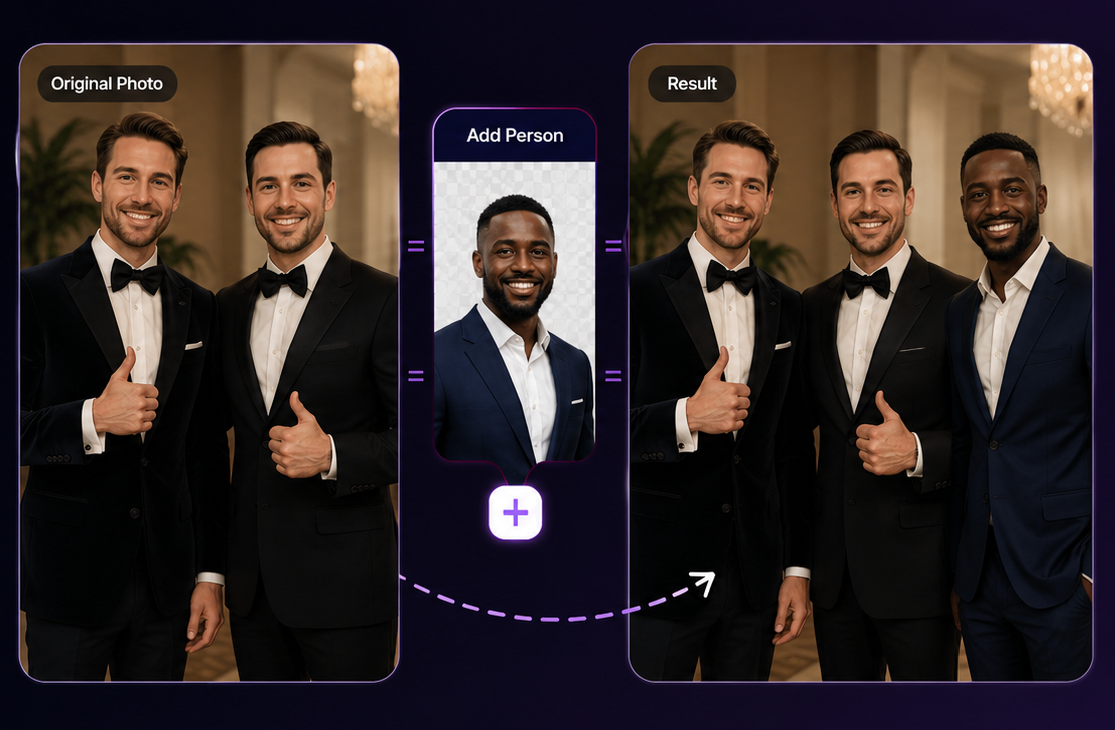
How to Add Person to a Photo
Our AI add to photo technology changes all of that. Whether you want to add a friend to a vacation photo, insert a colleague into a team portrait, or blend two separate shots into one seamless image, our AI add person to photo tool makes the process instant — no technical knowledge, no software installation, just results.
Upload Your Background Photo
Select the scene you want to use as the base — the image you'd like to add a person into. Our add person to photo tool supports JPG, PNG, and WebP files up to 25 MB. The background photo sets the stage for the final composite.
Upload the Person's Photo
Choose the photo of the person you want to add to your image (up to 3). The clearer the photo, the better the AI can extract their likeness and integrate it naturally. Our AI add to photo engine handles everything from edge detection to lighting adaptation automatically.
Describe Where to Place Them
Tell the AI exactly where to place the person — for example, "on the left side," "in the background," or "standing next to the building." A default prompt is ready to use if you prefer. This step gives the AI the spatial context it needs to compose the scene naturally.
Generate and Download
Click the button and our AI add to photo tool delivers the result in seconds. Review the result, download it in full resolution, and share it — all from your browser. No watermarks, no quality loss, no hidden steps.
How to Add People to Photo on iPhone
Many people search for how to add people to photo on iPhone expecting to need a specialized app or a desktop computer. The answer is simpler: our AI add person to photo tool runs entirely in your mobile browser. Open Safari or Chrome on your iPhone and follow these steps — no app store visit, no installation required.
Open your iPhone browser and navigate to our Add Person to Photo page.
Tap the "Background Photo" upload zone — your iPhone photo library opens automatically.
Select the background image you want to use as the scene.
Tap the "Person Photo" upload zone and choose the photo of the person to add.
Adjust the placement prompt if needed, or keep the provided default.
Tap Start Compositing — the AI processes your request and delivers the result in under 30 seconds.
Tap the Download button to save the full-resolution result directly to your iPhone camera roll.
Works on All iPhones
Compatible with iPhone 8 and later running iOS 14+. Also works on iPad, Android phones, and any device with a modern browser. Adding people to photos on iPhone has never been simpler — the same AI add to photo quality you get on desktop is fully available on mobile.
- ✓ No app download needed
- ✓ Works on Safari & Chrome
- ✓ Save directly to camera roll
- ✓ Full-resolution output
Why Our AI Add to Photo Stands Apart
Not all AI add person to photo tools deliver the same results. Here's what sets ours apart.
One-Click Completion
Traditional photo compositing means cutting subjects with the pen tool, manually matching lighting, painting shadows, correcting color temperature, and blending edges — a process that can take hours even for professionals. Our AI add person to photo tool eliminates every manual step. The AI add to photo engine handles background extraction, edge refinement, shadow generation, lighting adaptation, and color matching automatically. From upload to finished result in under a minute.
Seamlessly Natural Blending
The hardest challenge when adding a person to a photo is making the result look real — not pasted in. Our AI add to photo model analyzes the lighting direction, color temperature, perspective, and shadow angles in your background photo, then adjusts the person's image to match exactly. Skin tones adapt to ambient light. Shadows fall in the right direction. The final composite looks like everyone was photographed together in the same moment.
Powered by the Latest AI Model
We continuously update our AI add to photo technology to use the most advanced model available. The model understands complex visual relationships — depth of field consistency, background blur matching, scene-aware color grading, and precise subject edge detection. Even challenging scenarios like outdoor sunlight, crowded backgrounds, or mixed skin tones produce photorealistic, high-fidelity results.
No Design Skills Needed
Our AI add to photo tool is designed for everyone — not just professional photographers or designers. You don't need to know Photoshop, understand layers, work with masks, or have any editing experience. If you can select a file and type a short description, you can create high-quality composite photos that look professionally made.
Frequently Asked Questions
Everything you need to know about privacy, data, and how we handle your photos.
Is my photo data private and secure?
Yes. Privacy is our top priority when you use our AI add person to photo service. Photos you upload are used solely to process your request and are never shared with third parties, used for targeted advertising, or sold. All data is transmitted using encrypted connections. Your photos belong to you — we are simply the tool.
How long are my photos stored on your servers?
Your uploaded photos are stored only for the duration of the AI processing job — typically less than two minutes. Once your result is generated, the original images are automatically and permanently deleted from our servers. We do not retain backups or copies of any photo you upload.
Are my photos used to train AI models?
Never. Your personal photos are never used to train, fine-tune, or update any AI model. We maintain a strict no-training policy. Your images are processed to deliver your result and then discarded. Uploading a photo to add person to photo does not contribute it to any dataset.
Is it safe to upload photos that contain other people?
Yes. All photo processing through our AI add to photo tool is fully automated — no human reviewer ever views your uploaded images. Photos are handled in a secure, isolated environment with strict access controls. Combined with automatic deletion after processing, this ensures that photos of friends, family, or colleagues remain completely private.
Do I need an account to use the tool?
Creating a free account gives you daily credits to add person to photo at no cost — no credit card required. You receive free credits each day simply by signing in. For higher-volume usage, affordable credit packs are available. Guest access is also available for trying the tool before committing.